Burner Email: What It Is and How to Get One in a Second

In This Article
A burner email is a temporary email address you give to a website instead of your real one. Its mail lands in the burner’s own inbox, your real inbox never sees it, and the address is deleted when you are done.
On Pokemail you get a burner email the moment the page opens. There is no signup, no registration and no personal data.
What Is a Burner Email?
A burner email is an email address made to be used once and left behind. The name comes from the burner phone: a number you use for one job and then drop.
A burner email does three things:
- It receives real mail. A verification code, a download link or a welcome message arrives like it would anywhere else.
- It stands between you and the sender. The website learns the burner address and nothing else about your mail.
- It ends. The inbox and its messages are deleted, so later marketing has nowhere to land.
People call the same tool by several names. A burner email address, burner mail, a throwaway email, a disposable email and temp mail are all the same thing. Some call it a fake email, though the address is real and it works.
| Name | Where you hear it | Meaning |
|---|---|---|
| Burner email, burner mail | Everyday speech, forums | An address you use once and drop |
| Throwaway email | Reddit and other forums | The same, often for a throwaway account |
| Disposable email | Help pages, sign-up forms | The same, the formal word |
| Temporary email, temp mail | Search and app stores | The same, named for its short life |
The word changes with the place, not the tool. Our page on the throwaway email covers the same ground under its other name.
The same idea for a conversation is a chat room that opens with a secret word.
How to Get a Burner Email in One Second
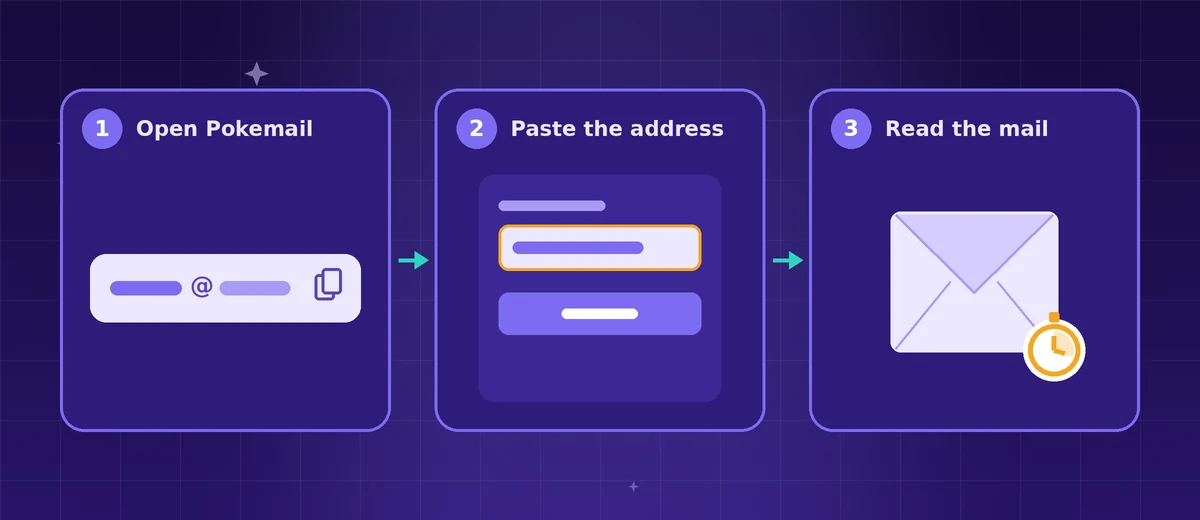
You do not create a burner email on Pokemail. It is already there when the page opens.
- Open pokemail.app. A burner email address of 7 random characters is on the screen.
- Press Copy. The address is on your clipboard.
- Paste it into the form that asks for your email.
- Read the reply in the same tab. Mail appears in real time, with no refreshing.
- Close the tab when you are done. After 60 minutes the inbox and its mail are deleted.
Three details make the burner more useful:
- Pick your own name. The pencil beside the address lets you choose the name before the @.
- Use the encrypted address. Every inbox also shows a second, encrypted address. Give that one to a site you do not trust, and the site never learns the inbox’s own name.
- Prepare an address ahead. The burner email generator makes a fresh address in one click and opens its inbox when you need it.
When to Use a Burner Email
Use a burner email whenever a site needs an address and you do not need the site.
- One-time downloads. An ebook, a template or a report that sits behind an email form.
- Free trials and demos. You test the product first and decide later.
- Coupons and first-order discounts. The code arrives, and the daily offers that follow do not reach you.
- Wi-Fi and event sign-ins. A café, an airport or a conference asks for an email before it lets you online.
- Forums and comment sections. One question, one answer, no lasting account.
- Throwaway accounts. A throwaway account on Reddit or another platform that asks for an email at sign-up.
- A one-off classified ad. A marketplace message from a stranger, answered once.
- Testing your own product. Developers check sign-up mail, password resets and templates without filling a real mailbox.
Each of these is a place where spam starts. A burner stops it before the first message, which is the cheapest moment to stop spam emails.
When Not to Use a Burner Email
A burner email is the wrong tool for anything you must reach again later.
- Banks, tax and government accounts. They write to you for years.
- Health, insurance and legal matters. The mail is private and it matters.
- Work and school. Use the address your employer or school gave you.
- Accounts you will keep. A password reset goes to the address on file, and a deleted burner cannot receive it.
- Orders with a warranty or a return. The receipt may be needed long after the first hour.
For those, use your real address, an alias or a second mailbox. The next section compares the three.
Burner Email vs Alias vs Second Mailbox
All three keep your main address away from a sender. They differ in how long they last and where the mail goes.
| Option | How it works | Best for |
|---|---|---|
| Burner email | A temporary address with its own inbox. No account. Ready in one second. Deletes itself. | One-time signups, codes, downloads |
| Email alias | A lasting address that forwards to your real inbox. Needs an account. Works until you switch it off. | Accounts you keep but do not trust |
| Second mailbox | A second full email account you sign in to. Works until you close it. | Shopping, newsletters, a separate identity |
One more difference decides most cases. A password reset sent next year still reaches an alias or a second mailbox. It cannot reach a burner that has been deleted.
An alias is a forwarding address. SimpleLogin describes its own service this way: emails sent to an alias are forwarded to your inbox. addy.io says each site gets its own address that forwards to your inbox, and that you can switch any of them off. Apple’s Hide My Email makes random addresses that forward to your personal account, for iCloud+ subscribers.
A second mailbox is a whole account you sign in to. It suits mail you want to read, in a place apart from your main inbox.
A burner is the only one of the three that needs no account and leaves nothing behind. Our temporary email vs alias guide goes deeper, and the Gmail dot and plus tricks are a fourth option that files mail without hiding your address. A temporary Gmail is not something Gmail offers.
What Makes a Good Burner Email
Not every burner email service works the same way. Five things decide whether one is worth using.
- A random address, not a name anyone can type. Some services open any inbox to whoever types its name. Guerrilla Mail’s own page says anyone who knows the Inbox ID may have access to that inbox. YOPmail’s own page says its temporary inboxes are not password protected. Pokemail gives you 7 random characters, about 78 billion combinations, so nobody lands on your inbox by guessing a name.
- Mail in real time. A verification code is only useful while the form is still open. Pokemail shows a message the moment it arrives.
- No signup. A burner that asks for your real email first has missed the point. Pokemail asks for nothing: no registration and no personal data.
- No ads and no tracking. A privacy tool should not watch you. Pokemail shows no ads and does no tracking.
- A clear end. You should know when the inbox goes. On Pokemail it is 60 minutes, and the mail goes with it. Our page on how long a temporary email should last sets each service’s own figure side by side.
Pokemail is also newer than the long-established services, and its domain still gets accepted where older ones are blocked. For a wider look at the field, read our comparison of the best temporary email services.
Is a Burner Email Safe?
A burner email is safe for what it is made for: short, low-stakes mail such as codes, links and confirmations.
Treat the address itself as the key. Anyone who has the address of an inbox can open that inbox on a service with no passwords, so keep a burner for one site and do not post it in public. The random address and the encrypted second address both exist for this reason.
Giving a website a burner address is an ordinary privacy choice. The website’s own terms still apply to the account you make with it. Our guide on whether temporary email is safe covers the details.
The Short Version
A burner email is an address you use once and never think about again. Open Pokemail, copy the address, paste it, read the mail, close the tab. Keep your real address for the people and accounts that matter. To own an email, sign up by becoming a member. Members can also send email, under the same rules.
Free temporary email in one click. No registration, no tracking. Auto-deletes in 60 minutes.
Frequently Asked Questions
What is a burner email?
A burner email is a temporary email address you give to a website instead of your real one. Mail sent to it lands in the burner's own inbox, never in yours. When you are done, the address and its mail are deleted. Burner mail, throwaway email, disposable email and temp mail are other names for the same thing.
How do I make a burner email?
Open pokemail.app. A burner email address is on the screen the moment the page loads, with no signup, no registration and no personal data. Press Copy, paste the address into the form that asks for your email, and read the reply in the same tab.
Is a burner email free?
Yes. A Pokemail burner email is free, with no signup, no ads and no tracking. You open the page, use the address, and close the tab.
How long does a burner email last?
A Pokemail burner email lasts 60 minutes. After that the inbox and every message in it are deleted. That is long enough for a verification code, a download link or a welcome message.
Can I send email from a burner email?
The free burner inbox receives mail. To own an email, sign up by becoming a member. Members can also send email, under the same rules.
Is a burner email the same as a throwaway email or temp mail?
Yes. Burner email, burner mail, throwaway email, disposable email, temporary email and temp mail all name the same tool: an address you use once and leave behind. Burner and throwaway are the everyday words; disposable and temporary are the formal ones.
Is a burner Gmail the same as a burner email?
No. A second Gmail address is a second mailbox: an account you create, keep and look after. A burner email has no account at all and deletes itself. Use a second mailbox for accounts you will keep, and a burner for everything you will not.
Can a burner email be traced back to me?
A burner email carries nothing of yours: no name, no phone number and no link to your real inbox. Pokemail asks for no personal data and does no tracking. The website you sign up on still sees what any website sees of a visitor, so a burner protects your email address, and the rest of your privacy is a separate job.
When should I not use a burner email?
Do not use a burner email for a bank, a tax or government account, your health records, your work, or any account you will need to recover later. Those need an address that is still yours next year. A burner is for the sites that only need somewhere to send one message.
What is the difference between a burner email and an alias?
A burner email has its own inbox and deletes itself, so nothing ever reaches your real mailbox. An alias is a lasting address that forwards to your real mailbox until you switch it off. Use a burner for one-time signups and an alias for accounts you keep.
Sources
What this page says of another service comes from that service's own pages, and what it says of Pokemail from the service itself, checked on November 13, 2026. How we write and check our posts.
Throwaway Email: What It Is and How to Make One in Seconds
A throwaway email is an address you use once and let go. How to make a throwaway email address in seconds, free and with no signup, and when to use one.
Is Temp Mail Safe? The Complete Guide to Temporary Email Safety
Is temp mail safe to use? A thorough look at disposable email safety, how inbox privacy actually works, and how to choose a secure service.
What Is an Email Alias? Temp Email vs Email Alias for Privacy
Comparing disposable email and email aliases for privacy. When to use each, what is a throwaway email, and why they solve different problems.