EmailOnDeck and Pokemail: What Each Temp Mail Does


In This Article
EmailOnDeck is a free temporary email service at emailondeck.com that gives you a disposable address in two steps, a captcha and a click, with no signup. Its own FAQ says the address usually lasts most of the day, and it sends mail only to other EmailOnDeck addresses.
Pokemail is a separate temporary email service at pokemail.app. One click gives you an inbox, and every inbox lasts 60 minutes.
We read every EmailOnDeck page quoted here on November 14, 2026. Each fact below names the page it comes from.
What is EmailOnDeck?
EmailOnDeck is a website and a set of apps that hand out temporary email addresses.
| Fact | What EmailOnDeck says | Where |
|---|---|---|
| What it is | ”EmailOnDeck provides you with a fast & free temporary email address in 2 easy steps!” | Its FAQ |
| How you get an address | ”Step 1: Complete the captcha. Step 2: Click Get Email.” | Its generator page |
| Registration | ”Free temp mail in 2 easy steps - no signup.” | Its front page |
| Whether it is free | ”EmailOnDeck is always simple and free” | Its front page |
| How long it has run | ”© 2015-2026 EmailOnDeck.com” | The foot of its pages |
| How much mail it has handled | ”Over 216,137,786 temporary emails processed.” | The foot of its pages, as it stood that day |
| How mail appears in the apps | ”Mail arrives in real time” | Its Google Play listing |
| The developer the App Store names | Lucid LX LLC | Its App Store listing |
Its front page also names its uses in its own words. “Use them when you buy or sell Bitcoins or trade cryptocurrency, at exchanges, or locally.” “They can be used for QA testing of emails, free trials and even for dating profiles and accounts.”
Email On Deck, Mail On Deck and mailondeck.com
People type the name in three ways: emailondeck, email on deck and mail on deck. The first two always mean EmailOnDeck.
“Mail on deck” can lead to a second site. mailondeck.com is a separate temporary email site with its own pages and its own name.
| emailondeck.com | mailondeck.com | |
|---|---|---|
| What its pages call it | EmailOnDeck | ”mailOnDeck.com” |
| When the domain was registered | June 22, 2015 | January 29, 2026 |
| Its registrar | Dynadot | Hostinger |
| Its name servers | DNS Made Easy | DreamHost |
The registration dates, registrars and name servers come from the public registry and DNS records, read on November 14, 2026. Who runs mailondeck.com is not stated on the pages we read.
Look at the address bar to know which site you opened. The rest of this page is about EmailOnDeck at emailondeck.com.
How long does an EmailOnDeck address last?
There is no fixed time. Its FAQ answers in these words: “There’s not a precise time, usually it lasts most of the day. It should last more than an hour, but if you close out of your browser or clear your cookies you may lose access to it faster.”
Two clocks run here. Your access lasts while your browser keeps its session. The address and its mail last until EmailOnDeck wipes them.
On the wipe, the FAQ says: “Wiping usually occurs a couple days after you created the email address.”
The red trash button ends an address at once. The FAQ warns: “there is no way to recover emails sent to your email address once you click this button.”
Can you send email from EmailOnDeck?
Only to other EmailOnDeck addresses. The FAQ says: “Yes, but only to other EmailOnDeck email addresses.”
So an EmailOnDeck address is made for receiving. It catches the confirmation mail of a sign-up and lets you read it on the site.
Can you recover an EmailOnDeck address?
Sometimes. EmailOnDeck has a recovery page that works with an email token.
- Under your address, click “show email token”.
- Copy the token. Its recovery article calls it a “(32 alphanumeric character)” code.
- Keep it safe. The article says “anyone who sees or has it can access your temporary emails.”
- Later, open the Recover Email page, enter the token, pass the captcha and click Recover.
The article names the limit: “Once the email address has been wiped, there’s no way to recover it, even with the Email Token.”
Who can read an EmailOnDeck inbox?
EmailOnDeck says only you can. Its FAQ: “Your emails are only viewable by you.”
The token is the exception you control. Whoever holds it can open the inbox, so keep it to yourself.
Is EmailOnDeck safe?
EmailOnDeck describes its own security in its FAQ.
| Topic | EmailOnDeck’s own words |
|---|---|
| Encryption in transit | ”Our site can be accessed via HTTPS and our email servers utilize TLS.” |
| Logs and backups | ”we wipe servers and logs continuously and keep no backups” |
| Old disks | ”Deleted disks are overwritten with zeros before that space is reused.” |
| The Chrome extension | ”Our Chrome extension never tracks, reads, or views your browsing history.” |
| What not to use it for | ”If you’re interacting with a site that you’ll be providing a credit card or other personal information (PII) you should not use a temporary email.” |
The last line is good advice for any temporary address. A temporary inbox suits a sign-up you will not need to recover. Our page on whether temporary email is safe covers the question for every service.
Does an EmailOnDeck address work on every site?
EmailOnDeck says it aims to. Its FAQ says: “EmailOnDeck makes it very difficult for websites to recognize our email addresses as temporary.”
Its generator page is more careful: “EmailOnDeck addresses tend to work where those get turned away, though not everywhere.” The FAQ asks users to report a site that refuses one.
EmailOnDeck’s apps and extensions
EmailOnDeck runs on four more places besides its website.
| Where | What its listing says |
|---|---|
| Android | ”Open the app and your address is ready.” The page also shows “Contains ads”. |
| iPhone | The same description. Developer: Lucid LX LLC. |
| Chrome | ”This extension does not track, read or view the websites you visit.” |
| Firefox | An extension, linked from its FAQ |
Its FAQ adds one point about the extensions: “the email addresses created on the browser extension are different from what you will find on the website itself.”
EmailOnDeck and Pokemail side by side
They are two separate temporary email services. Each cell below comes from that service’s own pages.
| EmailOnDeck | Pokemail | |
|---|---|---|
| Where you open it | emailondeck.com, its apps and extensions | pokemail.app, in the browser |
| How you get an address | A captcha, then “Get Email” | One click |
| Registration | ”no signup” | No signup, no personal data |
| How long it lasts | ”usually it lasts most of the day” | Every inbox lasts 60 minutes |
| How mail appears | In real time, by its app listings | In real time, over a WebSocket |
| The address | Made by EmailOnDeck | Randomly generated, with an encrypted address under it |
| Attachments | Shown under the message | Up to 2MB |
| Ads and tracking | ”Contains ads” on its Android listing | No ads, no tracking |
The encrypted address is a second, random address that delivers to the same Pokemail inbox. Mail sent to it can be read only inside the inbox that created it.
How Pokemail works
- Open pokemail.app.
- Click the button, and your inbox is ready.
- Copy the address, or the encrypted address under it, into the sign-up form.
- The message appears in your inbox in real time.
- After 60 minutes the inbox and its mail are deleted.
Pokemail asks for no email, no password and no phone number. Our FAQ answers the rest.
Which one for which job
Both services give you a free address with no signup. They differ in how long the address lasts and in what else they do.
| You want to | EmailOnDeck | Pokemail |
|---|---|---|
| Get an address with one click | A captcha and a click | One click |
| Receive a code or a link within the hour | Yes | Yes, in real time |
| Have the inbox go away by itself within the hour | Its address usually lasts most of the day | Every inbox lasts 60 minutes |
| Use a phone app | Android and iPhone apps | The website, in your phone’s browser |
| Use it with no ads | Its Android listing shows “Contains ads” | No ads |
For a wider view, our roundup of temporary email services sets many services side by side.
Looking for an EmailOnDeck alternative?
Pick by the job. For a quick sign-up or a verification code, any temporary inbox with no signup will do.
Pokemail is one. It gives you an inbox in one click, with no registration, no personal data, no ads and no tracking. Our pages on Mailinator alternatives, YopMail alternatives and Guerrilla Mail alternatives cover the other well-known names, each from its own pages.
Sources
Read on November 14, 2026.
- EmailOnDeck, front page, FAQ, generator page and recovery article.
- EmailOnDeck on Google Play, the App Store and the Chrome Web Store.
- mailondeck.com, its own pages.
- The public registry records of emailondeck.com and mailondeck.com (RDAP) and their DNS records.
- Pokemail’s own pages: the homepage and the FAQ.
Free temporary email in one click. No registration, no tracking. Auto-deletes in 60 minutes.
Frequently Asked Questions
What is EmailOnDeck?
EmailOnDeck is a free temporary email service at emailondeck.com. Its own FAQ says it gives you a fast and free temporary email address in two steps, a captcha and a click, with no signup. The copyright line on its pages starts in 2015.
Is EmailOnDeck free?
Yes. Its front page says EmailOnDeck is always simple and free. Its generator page says that getting an address and receiving mail are free, with no registration.
How long does an EmailOnDeck email last?
There is no fixed time. EmailOnDeck's FAQ says an address usually lasts most of the day and should last more than an hour. Closing the browser or clearing cookies can end your access sooner.
Can you send email from EmailOnDeck?
Only to other EmailOnDeck addresses. Its FAQ says this in those words. So an EmailOnDeck address is made for receiving mail from the sites you sign up to.
How do I recover my EmailOnDeck email?
With the email token, a code of 32 letters and numbers shown under your address. You enter it on the site's Recover Email page. EmailOnDeck says this works only until the address is wiped, which usually happens a couple of days after it was made.
Is EmailOnDeck safe?
Its FAQ says the site uses HTTPS, its mail servers use TLS, and it wipes servers and logs continuously with no backups. The same FAQ advises against using a temporary address on any site where you give a credit card or personal details. Use it for sign-ups you do not need to recover.
Who can read an EmailOnDeck inbox?
EmailOnDeck's FAQ says your emails are only viewable by you. Keep the email token private, because its recovery article says anyone who has it can open your temporary emails.
Is Email On Deck the same as Mail On Deck?
No. EmailOnDeck is the service at emailondeck.com, registered in 2015. mailondeck.com is a different site, registered in January 2026 with another registrar, and its pages carry their own name.
Does EmailOnDeck have an app?
Yes. It has apps for Android and iPhone and extensions for Chrome and Firefox. The App Store names the developer as Lucid LX LLC.
What is the difference between EmailOnDeck and Pokemail?
EmailOnDeck gives you an address after a captcha and a click, and the address usually lasts most of the day. Pokemail gives you an inbox in one click, with no signup and no personal data, and every inbox lasts 60 minutes. Mail appears in real time on both.
Is Pokemail an EmailOnDeck alternative?
Yes. Pokemail is a free temporary email service at pokemail.app, with no ads and no tracking. It suits a sign-up or a verification code that you need within the hour.
Why do people search for mail on deck?
Most mean EmailOnDeck, the temporary email service at emailondeck.com. The words also match mailondeck.com, a separate and newer site. Check the address in your browser to know which one you opened.
Sources
- Its FAQ emailondeck.com
- Its generator page emailondeck.com
- Its front page emailondeck.com
- Its Google Play listing play.google.com
- Its App Store listing apps.apple.com
- recovery article emailondeck.com
- Chrome Web Store chromewebstore.google.com
- mailondeck.com mailondeck.com
What this page says of another service comes from that service's own pages, and what it says of Pokemail from the service itself, checked on November 14, 2026. How we write and check our posts.

What Is sharklasers.com? The Email Domain Explained
sharklasers.com is a disposable email domain of Guerrilla Mail, like grr.la and pokemail.net. Who runs it, how it works, and what an address there means.
10 Best Temporary Email Services for 2027: Tested and Measured
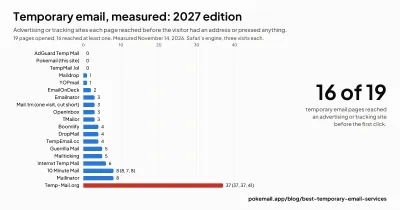
The 10 best temp email services for 2027 by one published formula: trackers, cookies, consent walls, open inboxes, headers. Every cell measured and shown.
Pokemail vs Mailinator: Which Temp Mail Should You Use?
Pokemail vs Mailinator compared head-to-head: inbox privacy, delivery speed, API access, and pricing. See which temporary email service fits your use case.